AI-enabled data services for e-ink readers and agents
The news, ranked by an editor that never sleeps, delivered wherever you read.
Every hour an LLM editor reads about a hundred feeds per topic and picks what matters, with a why-it-matters line and the facts. You get the result as JSON and MCP for your agents, or as a typeset morning paper on your reMarkable or Kindle. Eleven briefings, one of them new this week.
Free tier, no keyNo card for trialsMIT MCP server on npmx402 for agents that pay per call
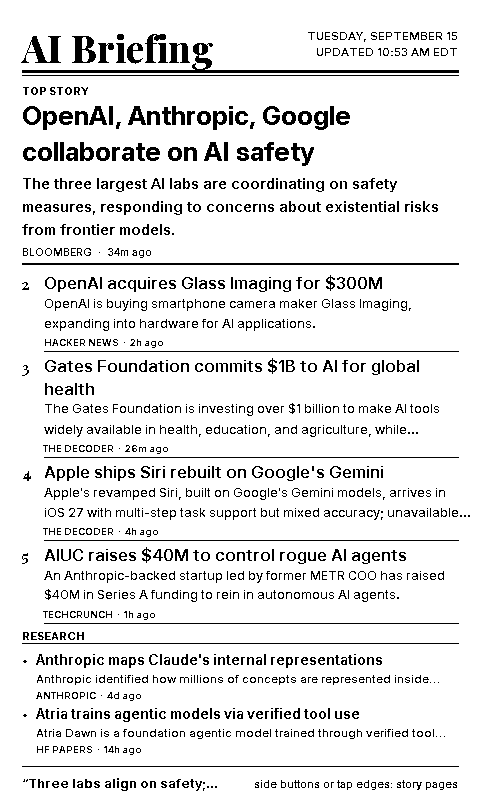
Live: the AI briefing front page, exactly as an e-ink device sees it.
Pick a service. Each one starts with one command or one form.
Same editor, same data, different delivery. Everything below is live today; the code blocks are copy-paste real, not illustrations.
Briefings API and MCP
for agents and developers
Eleven ranked briefings as structured JSON: lead, stories, why it matters, key points, sources. Rendered e-ink pages, a free summary, and the full candidate pool with provenance.
Any briefing as a multi-page paper on your device at 07:00 ET every day. Story text inside the file, not links out. PDF for reMarkable and Scribe, reflowable EPUB for Kindle.
Emailed as PDF or EPUB to any address or your Send-to-Kindle address; optional push to a reMarkable folder if you choose it
A one-page notice before the trial ends, with the keep link
Free PDF and EPUB downloads for every briefing, any time
Kindle: approve paper@wholemind.tech in Amazon's Send-to-Kindle settings first. Today's paper goes out the moment you sign up.
Noticias Lentas
Spanish learners, B1
The day's news from BBC Mundo, El País and 20minutos rewritten in simple Spanish at CEFR B1. Short sentences, common vocabulary, a small glossary in simple Spanish and two comprehension questions per story.
Six stories a day, ready before breakfast in Europe and the Americas
Free on the web, as EPUB and as a daily podcast (about six minutes, read slowly); every episode has its own page with the text, its sources and the vocabulary; Kindle delivery on a trial
For a class: each episode page prints as a handout, with the answer key on a separate sheet
A2 and French next if readers ask
Free to read · Kindle delivery: 7-day trial, then $9/month
Desk edition: the briefing as an object, pre-order
An e-ink display that arrives already on your Wi-Fi and showing a briefing. No app, no account, nothing to set up: unbox, plug in once, put it on the desk. Built to order by one person; nothing is charged until your unit is ready to build.
Shows the hourly briefing of your choice with a QR code on every story, refreshed on its own schedule. Stands on a desk or hangs on a wall. Runs the TRMNL platform with the News Briefing recipe already installed.
Pre-order below, or pay now: https://briefing-service.wholemind.workers.dev/billing/desk?device=desk
Ships two to three weeks after payment, US and EU. Full refund until it ships.
Pocket edition · $129
Xteink X4 Pro, 4.3-inch e-paper, USB-C, weeks per charge
All eleven briefings in your pocket, synced every hour in the background and readable offline: the AI briefing, markets, US and world news, sports, football, crypto, grants, and the slow Spanish edition. Also a CrossPoint e-reader for your own EPUBs.
Pre-order below, or pay now: https://briefing-service.wholemind.workers.dev/billing/desk?device=pocket
Ships two to three weeks after payment, US and EU. Full refund until it ships.
Pre-order, no card now
Leave an email and we send a payment link when your unit is ready to build. The setup card that comes with the link asks for your Wi-Fi name and password so the display arrives connected.
Nothing is charged now. Reader key optional: the display works without one.
Bring your own display
Every briefing is also a finished e-ink page: 800×480 for a panel on a desk (lead, six stories, a QR code per story), 480×800 for a portrait reader. Four ways to put one on a screen you already own, all free.
TRMNL
OG, X, Seeed reTerminal, any TRMNL-compatible panel
Install the News Briefing recipe, pick a briefing, done. It re-renders hourly with the editor's ranking; the layout fills the whole screen and every story carries a QR code that opens the article. Self-hosting with LaraPaper? It is in the community recipe catalog: Add → Import from OSS Catalog.
trmnl.com/recipes/472511
Nine hourly briefings and two daily editions to choose from in the recipe's settings.
InkyPi
Raspberry Pi + Inky Impression or Waveshare
A third-party plugin: pick a briefing in the web UI, set the refresh to 60 minutes. Landscape panels get the 800×480 page, portrait panels the front page. No key, no account.
One config: the device fetches the page every hour and draws it. Pins below are the reTerminal E1001's, from Seeed's ESPHome cookbook; change the display block for another panel and the URL for another briefing.
Show the config
# ESPHome: a Seeed reTerminal E1001 (or any 800x480 e-paper on an ESP32-S3)
# that shows the AI Briefing page and refreshes it every hour.
esphome:
  name: briefing-display
esp32:
  board: esp32-s3-devkitc-1
  framework:
    type: esp-idf
psram:
  mode: octal
  speed: 80MHz
wifi:
  ssid: "YourNetwork"
  password: "your-wifi-password"
logger:
http_request:
image:
  - platform: online_image
    id: briefing
    url: https://wholemind.tech/x4/latest-wide.png   # finance/latest-wide.png, world/latest-wide.png, ...
    format: PNG
    type: BINARY
    update_interval: 60min
    on_download_finished:
      - component.update: epaper
spi:
  clk_pin: GPIO7
  mosi_pin: GPIO9
display:
  - platform: waveshare_epaper
    id: epaper
    model: 7.50inv2
    cs_pin: GPIO10
    dc_pin: GPIO11
    reset_pin: GPIO12
    busy_pin:
      number: GPIO13
      inverted: true
    update_interval: never
    lambda: |-
      it.image(0, 0, id(briefing));
Portrait panel? Use latest.png (480×800) and rotate in the display block.
Glance
the self-hosted dashboard, on any browser or wall screen
A custom-api widget: the lead with its why-it-matters line, then twelve ranked stories with two-line snippets, source and age, collapsed after six. Paste it into your glance.yml and swap ai for any key. No key, no account; the summary endpoint is unmetered.
Submitted to the community widget catalog: glanceapp/community-widgets #323. Keys and page URLs for title-url are in its README.
Any screen that can show a PNG
Inkycal, Inkplate, Kindle jailbreaks, a browser, a Raspberry Pi with a frame
The pages are plain files with stable URLs and no key. Fetch one on whatever schedule you like; a manifest next to each briefing says when it last changed.
1-bit PNGs drawn for e-ink: no dithering needed, about 8 KB each. Inkycal: add its Image module with one of these URLs as the path and palette bw; no code, it fetches the URL itself.
How a trial works
No account, no card. A paper trial is tied to one Kindle address or one reMarkable; the API tier needs nothing at all.
DAY 0
Start
Sign up on the form or with one curl. Today's paper goes out immediately, then every morning at 07:00 ET. You get an id; that id is your account.
DAYS 6 AND 7
Decide
The last two papers carry a one-page notice with the end date and a one-click keep link. Nothing is charged unless you use it.
DAY 8
Keep or stop
Keep it with a $9/month Reader key. Or do nothing and delivery simply stops. Cancel any time from the billing portal below.
Pricing
Two ways to pay: a monthly key through Stripe, or per call in USDC on Base through x402 for agents that would rather not have an account.